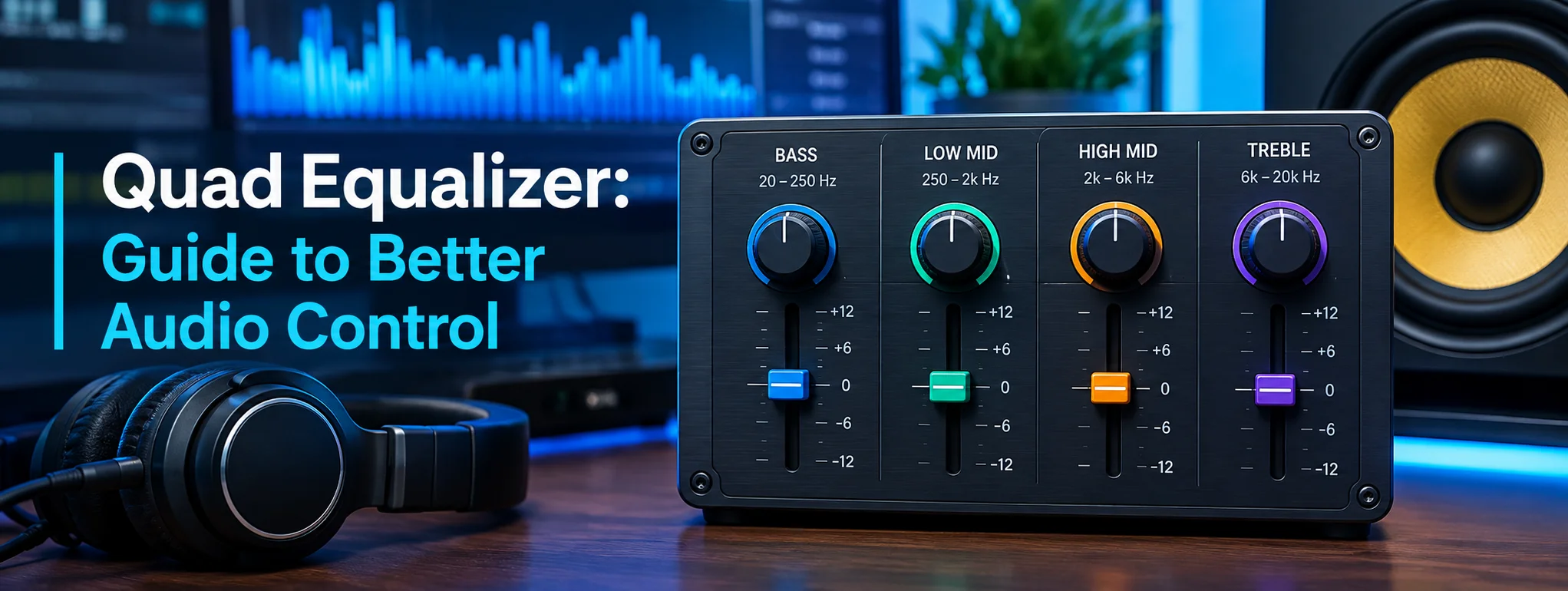
A Quad Equalizer is an audio-processing tool designed to give listeners more control over different parts of the sound spectrum. Instead of treating the entire audio signal as one unit, it divides sound into four adjustable frequency bands. This makes it easier to shape music, podcasts, movies, games, and other audio content according to personal preferences.
A well-adjusted Quad Equalizer can transform an ordinary listening experience into something clearer, richer, and more enjoyable. Whether you want stronger bass, sharper vocals, or smoother high frequencies, understanding how each band works can help you create a balanced sound without making the audio harsh or distorted.
How a Quad Equalizer Works
A Quad Equalizer normally provides four separate controls for modifying frequency ranges. Each control affects a specific portion of the audio spectrum.
Low Frequencies
The lowest band generally handles bass. It influences sounds such as kick drums, deep electronic tones, bass guitars, and cinematic effects. Increasing this band can make audio feel powerful and energetic.
However, excessive bass can make music sound muddy. A small adjustment is often enough to create more depth without overwhelming vocals or instruments.
Low-Mid Frequencies
The second band commonly controls the low-mid range. This area contributes to the warmth and body of many instruments and voices.
If this range is too high, audio may sound thick or congested. Reducing it slightly can reveal details that were previously hidden behind heavy sound.
High-Mid Frequencies
The third band affects an important area for speech clarity and instrumental detail. Vocals, guitars, piano notes, and many other sounds contain energy in this region.
A carefully increased high-mid setting can make dialogue easier to understand. Too much adjustment, however, may introduce an aggressive or tiring character.
High Frequencies
The fourth band usually controls treble and other high-frequency details. It contributes brightness, air, and crispness.
Increasing treble can make cymbals and vocals sound more defined. If pushed too far, the result may become sharp or unpleasant, especially when listening through bright headphones.
Why Use a Quad Equalizer?
The biggest advantage of a Quad Equalizer is simplicity. Four bands provide meaningful control without presenting an overwhelming number of settings.
This makes the system useful for beginners as well as experienced listeners. You can make targeted changes while keeping the overall sound natural.
A Quad Equalizer can also compensate for differences between headphones, speakers, rooms, and recording styles. Some headphones naturally emphasize bass, while others produce brighter treble. Equalization can help bring the presentation closer to your preferred sound.
Quad Equalizer Settings for Different Audio
There is no universal setting that sounds perfect for everyone. Your equipment, hearing, music selection, and personal taste all influence the result.
Music Listening
For music, begin with a relatively flat setting. From there, make small adjustments rather than immediately increasing every band.
For bass-heavy music, a modest low-frequency boost may add excitement. For acoustic or vocal recordings, reducing excessive low-mid energy and making a subtle high-mid adjustment may improve clarity.
Movies and Television
Movies often benefit from controlled bass and clear dialogue. A small bass increase can make action sequences more immersive, while carefully managing the midrange can help spoken words remain understandable.
Gaming
Gaming audio depends heavily on the title. Explosions and environmental effects benefit from controlled low frequencies, while footsteps and dialogue may become easier to hear when the mid and high frequencies are properly balanced.
A Simple Quad Equalizer Adjustment Guide
| Frequency Area | Main Effect | Possible Adjustment |
|---|---|---|
| Low | Bass and depth | Increase slightly for impact |
| Low-Mid | Warmth and body | Reduce if sound feels muddy |
| High-Mid | Vocal and instrument clarity | Increase carefully for detail |
| High | Brightness and crispness | Increase if audio feels dull |
The most important principle is moderation. Large boosts can introduce distortion, reduce clarity, and make listening uncomfortable. Instead, use small changes and listen carefully after every adjustment.
Common Mistakes to Avoid
One common mistake is boosting every frequency band. This can increase overall loudness without actually improving quality. It may also create distortion or an overly aggressive sound.
Another mistake is relying on extreme presets. A setting that sounds impressive for a few minutes may become tiring during longer listening sessions.
It is also useful to remember that equalization cannot completely repair a poor recording. If the original audio has severe clipping, noise, or compression artifacts, an equalizer has limited ability to restore lost information.
Tips for Getting Better Results
Start with the equalizer set close to neutral. Play a familiar song or recording that you know well. Then adjust only one band at a time.
Keep changes relatively small and compare the modified sound with the original. Lowering an unwanted frequency can sometimes produce better results than boosting another one.
Your listening environment matters too. Room reflections can influence speakers significantly, while headphone design can affect the perceived balance. For this reason, an adjustment that works beautifully on one device may sound different on another.
Final Thoughts
A Quad Equalizer offers a practical way to shape audio without requiring complicated sound-processing knowledge. Its four-band approach provides useful control over bass, warmth, clarity, and treble while keeping the adjustment process straightforward.
The secret to excellent equalization is not extreme settings but careful listening. Start with a balanced profile, make subtle changes, and focus on what your audio actually needs. With the right approach, a Quad Equalizer can unlock a more powerful, detailed, and satisfying listening experience.
FAQs
1. What does a Quad Equalizer control?
It controls four different areas of the audio frequency spectrum, allowing users to adjust bass, midst, and treble characteristics.
2. Can a Quad Equalizer improve vocals?
Yes. Carefully adjusting the mid and high-mid frequencies can make vocals and dialogue clearer.
3. Should all four bands be increased?
No. Increasing every band can reduce clarity and cause distortion. Small, targeted adjustments are usually more effective.
4. Is a Quad Equalizer useful for gaming?
Yes. It can help balance effects, dialogue, environmental sounds, and other important gaming audio.
5. Are equalizer settings the same for every device?
No. Headphones, speakers, recordings, rooms, and personal preferences can all affect the ideal settings.





One thought on “Quad Equalizer: Guide to Better Audio Control”